


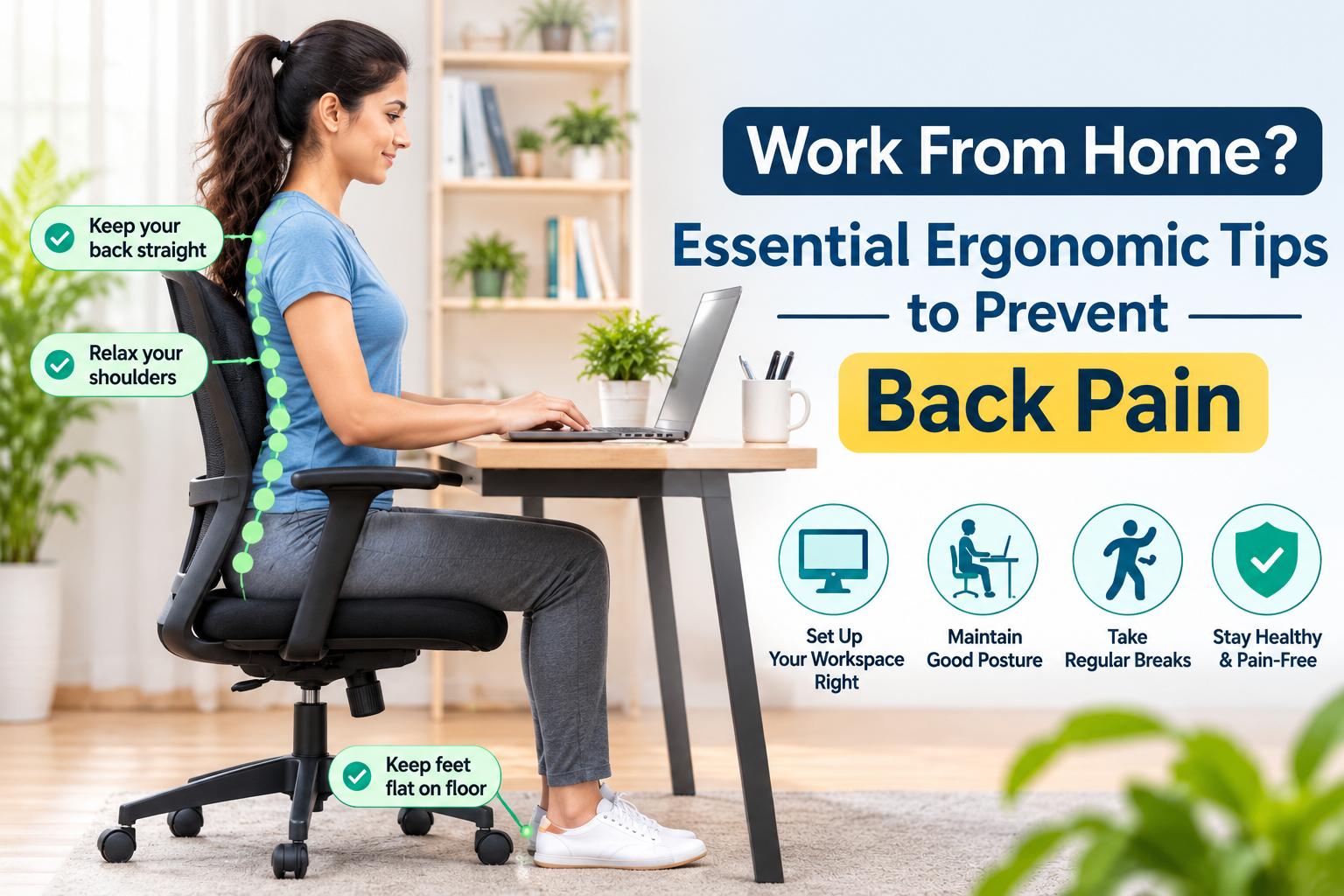

Working from home offers flexibility and convenience, but spending long hours sitting in front of a laptop can take a toll on your back, neck, and shoulders. Many people working remotely experience lower back pain, neck stiffness, shoulder discomfort, and muscle fatigue because of poorly arranged workstations and prolonged sitting.
Unlike a traditional office, a home workspace may not have an ergonomic chair, an adjustable desk, or a proper monitor setup. Working from a bed, sofa, or dining table can also encourage uncomfortable positions that increase physical strain.
The good news is that a few simple ergonomic adjustments and regular movement breaks can help make your home workspace more comfortable.
At PhysioPulse, Gurgaon, we focus on posture awareness, ergonomic assessment, and physiotherapy-based guidance to help individuals manage posture-related discomfort and improve their daily movement habits.
Why Does Working From Home Cause Back Pain?
Working from home does not automatically cause back pain. However, certain habits and workstation arrangements may contribute to discomfort.
Here are some common reasons:
1. Sitting for Long Hours
Remaining seated for extended periods without movement breaks can increase muscular fatigue and discomfort. Your back and hip muscles may become uncomfortable when you maintain the same position for too long.
2. Working on a Laptop Without Proper Setup
Many people place their laptops directly on a table. This can cause them to look downward for extended periods, potentially increasing neck and upper-back discomfort.
3. Poor Sitting Posture
Slouching, leaning forward, sitting without adequate back support, or keeping your feet unsupported may make prolonged desk work uncomfortable.
4. Working From a Bed or Sofa
Beds and sofas are designed for relaxation rather than prolonged computer work. Their soft surfaces often make it difficult to maintain a comfortable and supported working position.
5. Lack of Physical Activity
When working remotely, people may walk less than they would in an office. Reduced daily movement and prolonged sitting can contribute to stiffness and reduced physical activity.
10 Essential Ergonomic Tips to Prevent Back Pain While Working From Home
Making your workspace more comfortable does not require expensive equipment. Small changes can make a meaningful difference.
1. Maintain a Comfortable Sitting Posture
Sit with your back comfortably supported by the chair. Keep your shoulders relaxed and avoid leaning forward continuously.
Your posture should feel natural rather than rigid. Remember that there is no single perfect sitting position that you need to maintain throughout the day.
2. Adjust Your Laptop or Monitor Height
Your screen should be positioned approximately at eye level so you do not need to repeatedly bend your neck downward.
If you use a laptop for extended periods, consider using a laptop stand with an external keyboard and mouse.
3. Choose a Supportive Chair
A comfortable chair with adequate back support can help make prolonged sitting easier.
Look for:
- Support for your lower back.
- Adjustable seat height, if possible.
- A comfortable seat depth.
- Armrests that allow your shoulders to remain relaxed.
- Stable support for your feet.
4. Keep Your Feet Properly Supported
Your feet should rest comfortably on the floor or on a footrest.
Avoid sitting with your legs dangling for long periods, as this may make your sitting position less comfortable.
5. Position Your Keyboard and Mouse Correctly
Keep your keyboard and mouse close enough that you do not need to stretch your arms forward.
Your elbows should remain comfortably near your body, with your shoulders relaxed and wrists in a neutral position.
6. Take Regular Movement Breaks
One of the most important ergonomic habits is changing your position regularly.
Try:
- Standing up periodically.
- Walking around your room.
- Performing gentle shoulder movements.
- Taking short breaks between tasks.
- Changing your sitting position when needed.
Even a well-designed workstation cannot replace regular movement.
7. Avoid Working From Your Bed
Working from your bed may feel comfortable initially, but it can encourage unsupported positions and prolonged neck bending.
Whenever possible, create a dedicated workspace with a stable table and supportive chair.
8. Keep Frequently Used Items Within Reach
Position your phone, notebook, water bottle, and other frequently used items close to your workstation.
This reduces repeated twisting, reaching, and awkward movements during work.
9. Include Simple Desk Exercises
Gentle movement can help reduce stiffness associated with prolonged sitting.
Some options include shoulder rolls, gentle neck movements, standing back extensions, and short walks.
Choose movements that feel comfortable and avoid exercises that aggravate your symptoms.
10. Maintain an Active Daily Routine
Ergonomics is not limited to your workstation. Regular physical activity also plays an important role in maintaining strength, mobility, and general physical health.
Include walking, appropriate strengthening exercises, and mobility activities in your daily routine.
Best Desk Exercises to Reduce Back and Neck Stiffness
Sitting for long periods can make your muscles feel stiff and tired. The following simple movements can be included in your workday, provided they are comfortable for you.
Desk Exercises: 15 Simple Office Exercises You Can Do at Work · Deskletics
1. Shoulder Rolls
Slowly roll your shoulders backward and forward. Perform 10 repetitions in each direction to encourage comfortable shoulder movement.
2. Standing Back Extensions
Stand comfortably with your hands on your hips. Gently extend your upper body backward within a comfortable range, then return to standing.
How To Stretch Your Neck And Shoulders At Your Desk Job
3. Seated Upper-Back Extension
Sit comfortably and gently extend your upper back over the chair’s backrest, without forcing your neck or lower back.
Desk-Worker Mobility: A 10-Minute Flow That Actually Feels Good – WILD FIELD HEALTH
4. Standing Hip Flexor Stretch
Place one foot forward and gently move your hips forward while keeping your upper body upright. This may help address tightness around the front of the hips.
Stop any movement that causes significant pain, tingling, numbness, or weakness. Exercises should be selected according to your individual needs.
What Is an Ergonomic Assessment?
An ergonomic assessment is an evaluation of how your workspace, working habits, and body positioning interact during daily activities.
The purpose is to identify factors that may contribute to discomfort and recommend practical adjustments to improve comfort and work efficiency.
A physiotherapy-based ergonomic assessment may include:
- Posture assessment: Observing your sitting and standing positions.
- Workstation evaluation: Checking chair height, desk arrangement, monitor position, keyboard, and mouse placement.
- Movement assessment: Evaluating flexibility, mobility, and relevant muscle strength.
- Pain assessment: Understanding discomfort in the neck, shoulders, back, or wrists.
- Personalized recommendations: Suggesting workstation modifications, movement breaks, and appropriate exercises.
An ergonomic assessment can be particularly useful for people who spend several hours working at a computer every day.
When Should You Consult a Physiotherapist for Work-Related Back Pain?
Occasional stiffness after a long working day may improve with movement and changes to your workspace. However, persistent or recurring discomfort should not be ignored.
Consider consulting a physiotherapist if you experience:
- Repeated lower back pain during or after work.
- Neck and shoulder stiffness.
- Difficulty sitting comfortably for extended periods.
- Pain that interferes with sleep or daily activities.
- Reduced flexibility or difficulty performing normal movements.
- Recurrent discomfort despite changing your workstation.
If back pain is accompanied by new leg weakness, numbness around the groin or saddle area, or loss of bladder or bowel control, seek emergency medical attention.
How PhysioPulse Helps With Posture and Ergonomic Problems in Gurgaon
At PhysioPulse, Sector 47, Gurgaon, we understand that prolonged desk work and unsuitable workstation arrangements can contribute to physical discomfort.
Our posture and ergonomic assessment approach focuses on identifying individual movement and workstation-related concerns.
Depending on your assessment, recommendations may include:
1. Posture Assessment
Evaluation of sitting, standing, and movement patterns to identify areas that may need attention.
2. Ergonomic Guidance
Practical suggestions for improving your home or office workstation setup.
3. Physiotherapy Exercises
Individualized exercises to improve mobility, strength, and muscular endurance.
4. Neck and Back Pain Management
Appropriate physiotherapy interventions to help manage musculoskeletal discomfort.
5. Workplace Posture Awareness
Guidance on movement breaks, desk exercises, and healthier working habits.
Our aim is to help you develop better movement habits and work more comfortably.
Looking for posture and ergonomic assessment in Gurgaon?
Visit PhysioPulse at:
F-44, Spaze Boulevard, Sector 47, Gurugram, Haryana.
Call: 9821740088